The Cloudflare WAF rule I use to block bots probing my site
If you open the analytics of any site you own, you will see it: a constant stream of requests for paths you never created. /.env, /wp-login.php, /.git/config, /config/.env, /backup.sql. A restless stream of requests trying to hack you.
I run a few projects behind Cloudflare, and I got tired of seeing that noise hit my origin and pollute my analytics. So I wrote one WAF custom rule that blocks the whole category of “scanner probing for juicy files” at the edge.
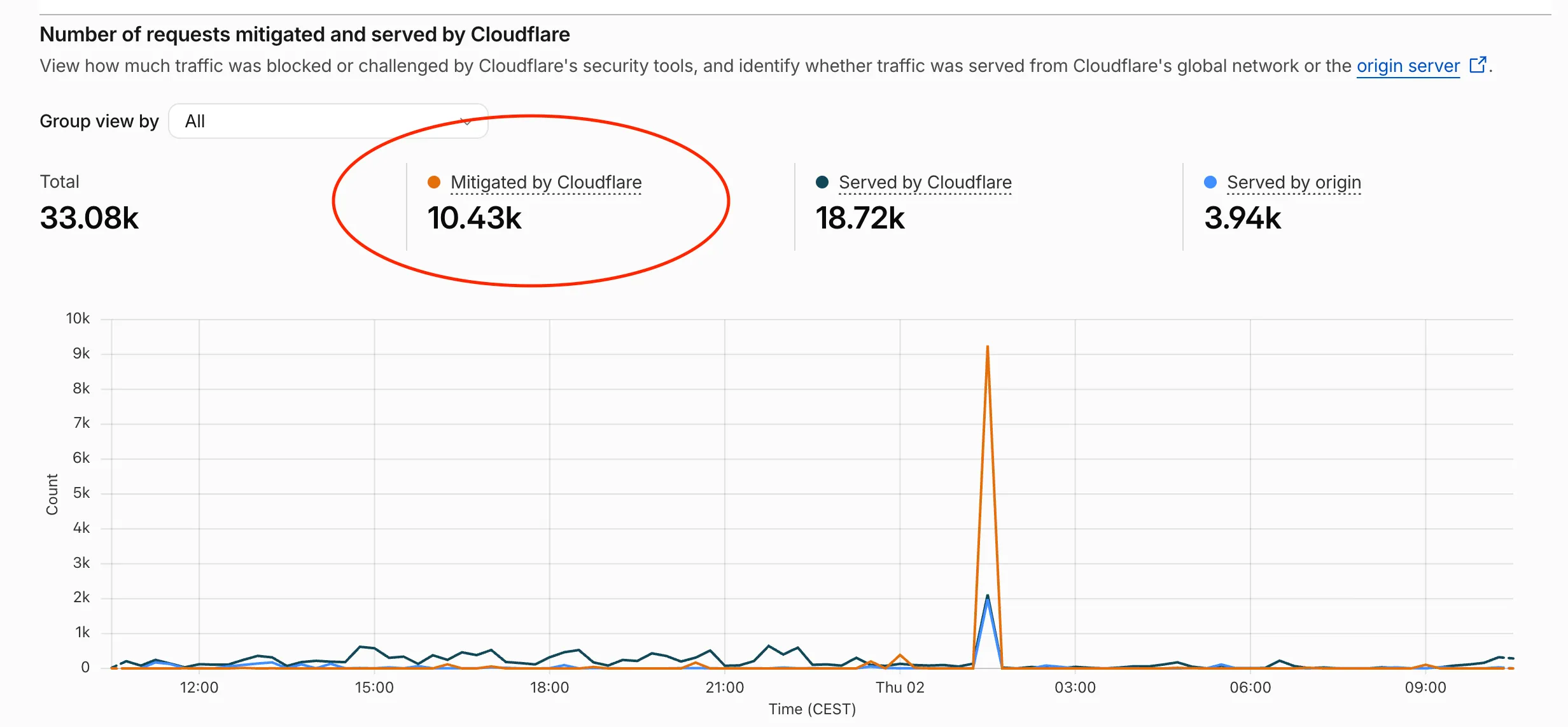
On GitNotifier alone, it blocked over 10 000 bot requests over the last 24h. During “calm” days, it’s only ~1000+ bad requests a day. Here is what that looks like in the Cloudflare traffic graph (the orange line is everything mitigated before it ever reaches my app):
Below is the rule, a breakdown of what each part does, and the parts you’ll want to tweak for your own stack.
TL;DR: I share one Cloudflare WAF custom rule to block most bots here. Copy it below, but read the “to tweak” section before you flip it to Block.
Why block this at the edge#
These requests are not curious humans. They are automated scanners crawling the entire internet looking for:
- leaked secrets and config files (
.env,credentials,.pem,.key) - exposed version control (
.git,.svn) - known CMS exploits (WordPress, Laravel, PHP)
- leftover infrastructure files (
.tfstate,docker, backups, SQL dumps)
It does not matter that my site is an Astro frontend on Cloudflare with a Workers backend and runs zero PHP. The bots do not check first, they just fire thousands of requests and hope something answers :(
Blocking them at Cloudflare’s edge means:
- the requests never reach my origin, so no wasted compute
- my logs and analytics stay readable, signal instead of noise (I often use Analytics Engine to track HTTP traffic, and the data pollution generated by these bots is awful).
- a real attacker probing for a real mistake gets a
403instead of a hint
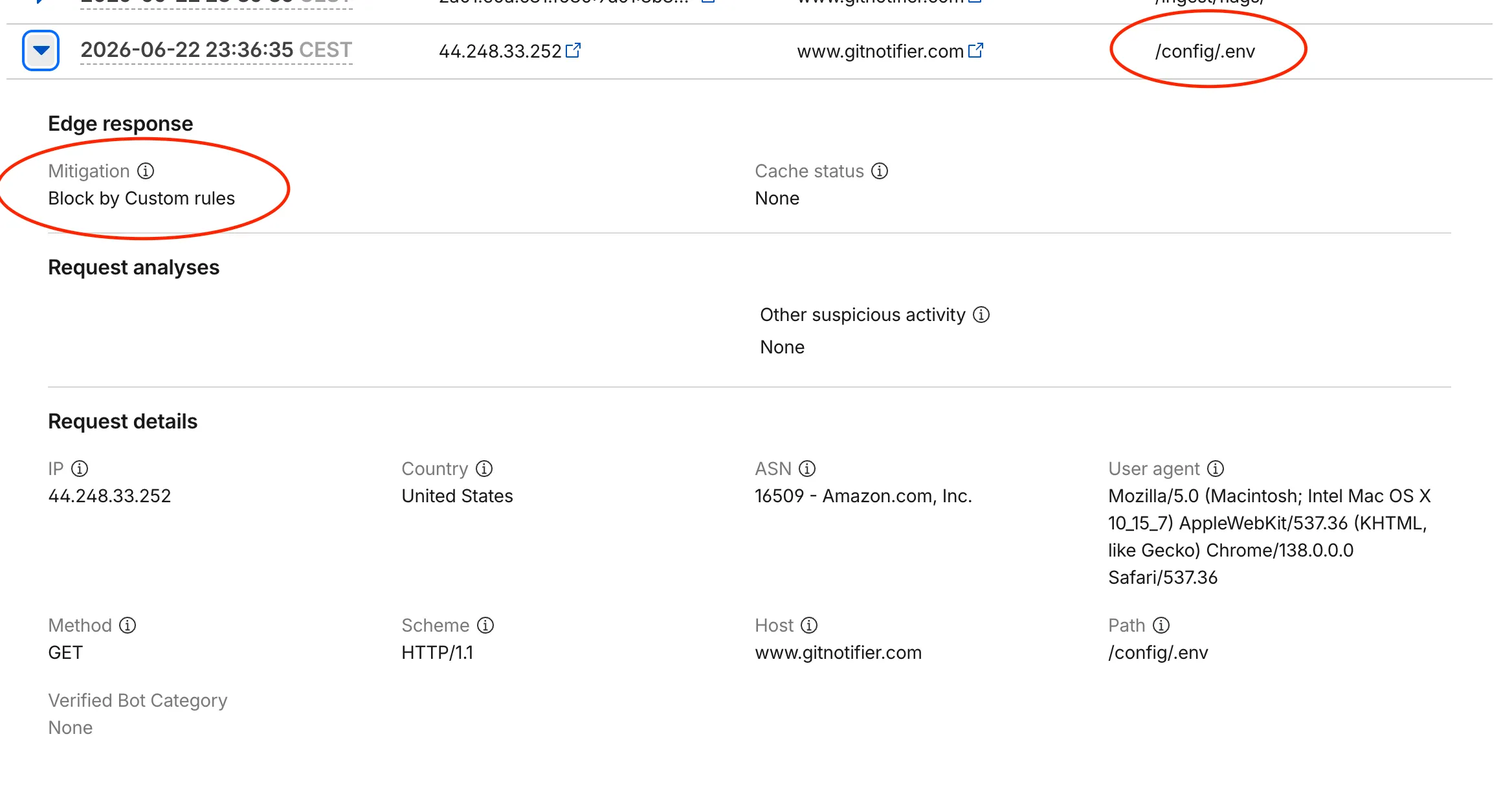
Here is a single blocked request, caught by the rule. Note the Mitigation: Block by Custom rules, the path /config/.env, and the user agent pretending to be a normal Chrome browser from an AWS IP:
The rule#
Go to Security → Security Rules → Custom rules in your Cloudflare dashboard, or just hit the button:
Give it a name (example: block bad bots) and then hit the Edit expression button to paste the followign:
(http.request.uri.path contains ".php") or
(http.request.uri.path contains "/wp-") or
(http.request.uri.path contains ".git") or
(http.request.uri.path contains ".svn") or
(http.request.uri.path contains "admin") or
(http.request.uri.path contains ".env") or
(http.request.uri.path contains "laravel") or
(http.request.uri.path contains "binary") or
(http.request.uri.path contains ".log") or
(http.request.uri.path contains ".sh") or
(http.request.uri.path contains ".ini") or
(http.request.uri.path contains ".zip") or
(http.request.uri.path contains "terraform") or
(http.request.uri.path contains "docker") or
(http.request.uri.path contains "kubernetes") or
(http.request.uri.path contains "credentials") or
(http.request.uri.path contains "secrets") or
(http.request.uri.path contains "/aws/") or
(http.request.uri.path contains "actuator") or
(http.request.uri.path contains "swagger") or
(http.request.uri.path contains "graphql") or
(http.request.uri.path contains "phpinfo") or
(http.request.uri.path contains "cgi-bin") or
(http.request.uri.path contains "/proc/") or
(http.request.uri.path contains "/etc/") or
(http.request.uri.path contains "backup") or
(http.request.uri.path contains "/.") or
(ends_with(http.request.uri.path, ".yml")) or
(ends_with(http.request.uri.path, ".yaml")) or
(ends_with(http.request.uri.path, ".key")) or
(ends_with(http.request.uri.path, ".pem")) or
(ends_with(http.request.uri.path, ".crt")) or
(ends_with(http.request.uri.path, ".bak")) or
(ends_with(http.request.uri.path, ".old")) or
(ends_with(http.request.uri.path, ".cfg")) or
(ends_with(http.request.uri.path, ".conf")) or
(ends_with(http.request.uri.path, ".sql")) or
(ends_with(http.request.uri.path, ".tfstate")) or
(ends_with(http.request.uri.path, ".tfvars"))
I use a similar rule across all my subdomains, and especially on GitNotifier, since the more the project grows, the more attention it gets from scanners.
Within minutes you will start seeing events pile up under Security → Events, filtered by your rule.
Breaking it down#
Do not copy this blindly. Here is what each group is actually catching, so you can decide what fits your site.
CMS and PHP probes — .php, /wp-, phpinfo, cgi-bin. The classic WordPress and PHP attack surface. If you do not run PHP, nothing legitimate ever hits these.
Secrets and config — .env, credentials, secrets, /aws/, and the ends_with matches .key, .pem, .crt, .cfg, .conf, .ini. Files that should never be web-served in the first place.
Version control — .git, .svn. Bots love a publicly exposed .git folder, it can leak your entire source history.
Infrastructure / DevOps — terraform, docker, kubernetes, plus ends_with on .tfstate and .tfvars, .yml, .yaml. A leaked .tfstate can contain plaintext secrets, so this one matters.
Backups and dumps — backup, .zip, .log, and ends_with on .bak, .old, .sql. The “oops I left a database dump in the web root” category.
Path traversal and dotfiles — /., /proc/, /etc/. Attempts to climb out of the web root and read system files.
Why some use contains and others ends_with#
contains matches the substring anywhere in the path. It is broad, which is great for catching things like /old/secrets/dump but risky for short or common words.
ends_with only matches the file extension at the end of the path. I use it for the extensions where a substring match would be too aggressive — .yml as a contains would wrongly match a path like /my-yaml-guide, but ends_with(".yml") only fires on an actual .yml file request.
The parts you need to tweak#
This is the important section. A few of these matches are broad on purpose, and they will cause false positives depending on your stack.
admin — This is a contains, so it matches any path with “admin” anywhere in it. If you have a real /admin dashboard, an /api/admin/... route, or anything with “admin” in the URL, this rule will block it. It can also collide with paths like Cloudflare’s own /cdn-cgi/ tooling and various framework internals. Treat this one as to be tweaked — narrow it to your real admin path, or drop it entirely if you serve an admin UI on the same hostname.
graphql — The one most likely to change for me. If you expose a GraphQL API on the same zone (/graphql), this rule will block every legitimate query. I currently do not, so I keep it. The day I do, this line goes away.
swagger, actuator, backup, docker, secrets — same warning, lighter. If you legitimately serve API docs at /swagger, a Spring /actuator endpoint, or have real routes containing these words, scope them down before enabling Block.
Extra caution if you host backend + frontend on the same zone#
If your zone is just a static or marketing site, you can enable this rule with Block and basically forget about it. Nothing real lives at these paths.
But if you host a backend API and a frontend on the same hostname, be much more careful. The broad contains matches — admin, graphql, docker, secrets, backup — are far more likely to collide with real API routes. In that case:
- Create the rule with action
Logfirst. - Let it run for a few days.
- Audit the matched events for anything legitimate.
- Remove or narrow the offending lines, then switch to
Block.
Takeaway#
This rule is not fool-proof, and it is no substitute for not leaking secrets in the first place. Do not serve a .git folder, do not leave a .tfstate in your web root, do not commit your .env. But given that scanners will probe you anyway, blocking the whole noisy category at the edge is a five-minute win.
Copy the rule, cut the lines that clash with your routes, keep an eye on graphql and admin, and enjoy a cleaner log.
On a related note, GitNotifier is the project I keep mentioning here, it sends the GitHub PR notifications you actually care about straight to your Slack DMs (it tells you when your merged PR breaks main, and mutes the bot noise). If that sounds useful, give it a try.
Anyway, I hope you find this useful!